Set up your school
Setup takes one sitting and five short steps. Nothing in it requires a document or a calendar connection.
Steps
- Open the link in your confirmation email and press Confirm and set up my school. You are signed in and setup opens.
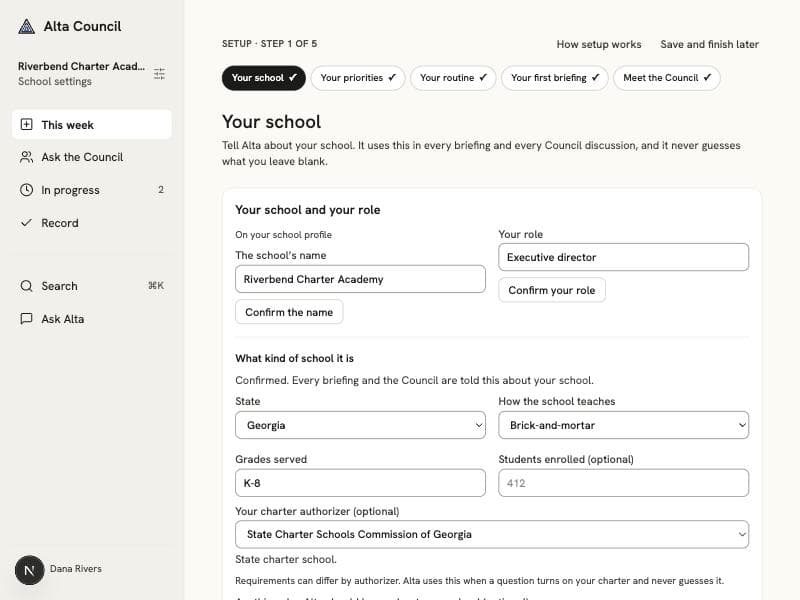
- Your school: confirm the school’s name and your role, then its state, whether it is brick-and-mortar, virtual, or hybrid, and the grades it serves. Choose your charter authorizer from your state’s list if you know it, and add a sentence about the school if you like.
- If you want, add a document: your charter, strategic plan, or a board policy. It is optional, and you can add documents at any time.
- Your priorities: name up to three things you are working on right now, in your own words or starting from a suggestion.
- Your routine: enter each meeting you hold regularly once, with when it next meets, its time, and how often it repeats.
- Your first briefing: read the terms for continuing after the pilot, then press Start my 14 days and prepare my briefing. Alta writes it in a minute or two.
- Meet the Council: read what each of the six advisors looks at, and ask them a real question when you are ready.
Worth knowing
- Save and finish later keeps everything you entered. The Getting started list on your home takes you back to the next step.
- Your 14 days start when your first briefing is written, not when you register.